Poor Posture at Work: Everyday Habits That May Be Affecting You
Learn how everyday workplace habits can contribute to poor posture, neck and back discomfort, and discover practical ways to improve alignment and movement.
Poor Posture at work can feel harmless at first. A slightly rounded back, a laptop placed too low or a chair that does not support your hips may seem like small details during a busy day. Over time, these habits can contribute to neck pain, back stiffness, headaches, shallow breathing, fatigue and reduced focus. For children doing homework, adults working at desks and professionals spending long hours on screens, posture is not just about looking upright. It affects comfort, movement, communication and daily performance.
How Poor Posture at Work Affects More Than Your Back
The body is designed to move, not to stay locked in one position for hours. When your head shifts forward, your shoulders round and your lower back collapses, the muscles around your spine have to work harder to hold you up. This can increase strain in the neck, shoulders and lower back.
Poor posture at work can also affect breathing. A compressed chest limits rib movement, which may make breathing feel more shallow. This matters for anyone who uses their voice throughout the day, including teachers, call center staff, presenters and therapists. At Speech therapy Dubai at Bridges Speech Center, therapists often consider the connection between posture, breathing, communication and functional daily skills when supporting children and adults.
Workplace posture is also linked to musculoskeletal discomfort. The United States Occupational Safety and Health Administration describes ergonomics as a way to fit the job to the person, helping reduce stress on the body. In practical terms, that means your screen, chair, desk height, keyboard position and movement breaks all matter.
If you notice repeated stiffness after work, frequent headaches or pain that improves when you move around, your workstation habits may be part of the problem. A focused approach to injury prevention in the workplace can help reduce strain before it becomes a more serious issue.
Everyday Habits That Turn Into Poor Posture
Many posture problems are not caused by one dramatic injury. They develop from repeated daily patterns. The good news is that small changes, made consistently, can improve comfort and body awareness.
Looking Down at a Laptop or Phone
A common cause of poor posture at work is looking down for long periods. When the screen is below eye level, the head moves forward and the upper back rounds. This position increases load on the neck and can lead to tightness around the shoulders.
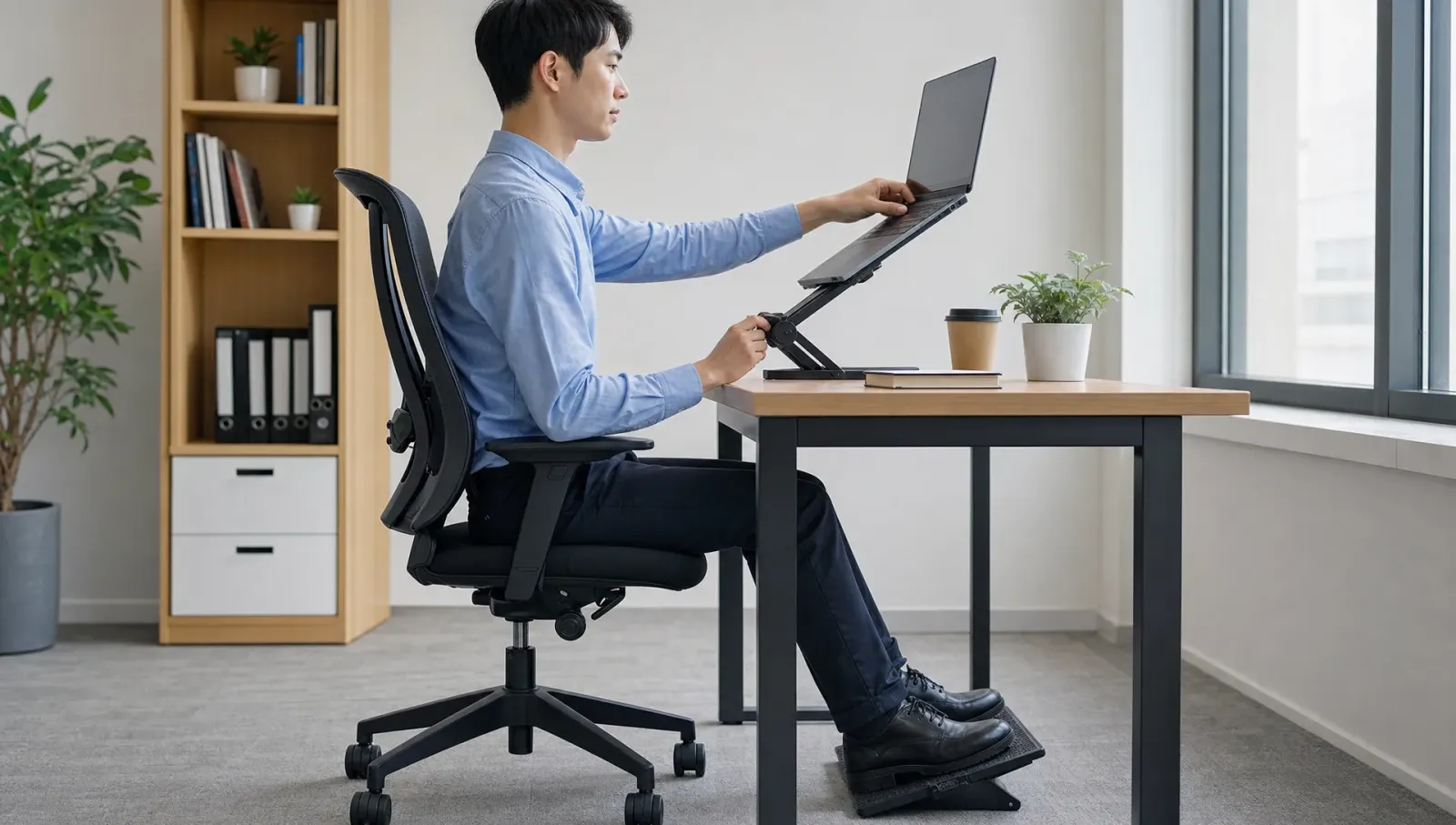
If you work on a laptop, raise it with a stand or stable platform and use an external keyboard and mouse. For phone use, bring the device closer to eye level instead of bending your neck down. These changes sound simple, but they can reduce the daily stress placed on your spine.
Poor Sitting Posture During Deep Work
Poor sitting posture often appears when you concentrate. You may start in a good position, then slowly slide forward, cross one leg, perch on the edge of the chair or lean to one side. After an hour, your body adapts to that shape and stiffness follows.
A better sitting position keeps your feet supported, hips slightly higher than knees, back supported and shoulders relaxed. Your elbows should stay close to your body with your screen placed at a comfortable height. If you want a detailed self-check, this guide to Correct sitting posture explains why sitting alignment matters for spine health, breathing and focus.
Staying Still for Too Long
Even the best chair cannot replace movement. A person can have an ergonomic posture at 9 a.m. and still feel pain by midday if they do not move. Muscles need circulation and joints need regular changes in position.
The World Health Organization recommends reducing sedentary time and replacing it with physical activity when possible. In an office setting, this can be as simple as standing during short calls, walking while discussing a task or doing gentle mobility exercises between meetings.
Quick Workplace Self-Check for Ergonomic Posture
Use this table to scan your workstation and body position. It is not a medical assessment, but it can help you identify common habits that contribute to Poor Posture.
| Area to Check | What May Be Happening | Helpful Adjustment |
| Screen height | Neck bends forward or chin pokes out | Raise screen so the top third is near eye level |
| Chair support | Lower back rounds or hips slide forward | Sit back with lumbar support and feet grounded |
| Keyboard and mouse | Shoulders lift or wrists bend sharply | Keep elbows close and wrists neutral |
| Phone use | Neck tilts down repeatedly | Bring phone up and take short visual breaks |
| Work rhythm | Body stays still for long blocks | Move for 1 to 2 minutes every 30 to 45 minutes |
| Breathing | Chest feels tight or shallow | Sit tall and allow ribs to expand comfortably |
Practical Fixes You Can Start Today
Poor Posture is easier to correct when you focus on habits instead of trying to sit perfectly all day. The goal is not rigid stillness. The goal is better alignment, frequent movement and less strain during repeated tasks.
Reset Your Desk in Five Minutes
Start with the screen. Your eyes should look forward without your chin lifting or dropping. If you use two monitors, place the one you use most directly in front of you. Keep your keyboard and mouse close enough that your elbows stay near your sides.
Next, check your chair. Your feet should rest on the floor or a footrest. If your chair is too high and your feet hang, the lower back and hips may feel strained. If the chair is too low, your knees may sit higher than your hips and encourage slumping.
A current workplace trend is the use of sit-stand desks, but standing all day is not the answer either. Alternating between sitting and standing works best when paired with movement. Change positions before discomfort starts.
Add Posture Correction Exercises to Your Routine
Posture correction exercises do not need to be complicated. Gentle chin tucks, shoulder blade squeezes, chest opening stretches, seated spinal rotations and hip flexor stretches can all support better alignment when done correctly.
A useful routine is to pick two or three movements and repeat them during natural breaks. For example, after a video meeting, stand up, stretch your chest and gently squeeze your shoulder blades for a few breaths. Before returning to work, reset your screen height and sitting position.
If pain is ongoing or movement feels restricted, guided posture correction can help you understand which muscles are tight, weak or overworking. This is especially helpful if your symptoms return even after changing your chair or desk.
Use Newer Tools Wisely
Wearable posture reminders, app-based break timers and telehealth ergonomic reviews have become more common in hybrid work settings. These tools can be useful, but they should not make you overly rigid or anxious about every position.
Use technology as a reminder to move, breathe and reset. A vibration from a posture device should prompt a gentle adjustment, not a forced military-style posture. Good ergonomic posture should feel supported and sustainable.
For people with pain, neurological conditions, sports injuries or recovery needs, structured care may be more effective than general advice. You can explore the physiotherapy services in dubai for more information on physiotherapy support and rehabilitation topics.
When Professional Support May Help
Occasional stiffness after a long day is common, but symptoms that keep returning should not be ignored. You may benefit from professional guidance if you have pain that spreads into the arm or leg, numbness, tingling, weakness, headaches linked with neck tension or difficulty sitting through normal work tasks.
Children may also need support when posture affects handwriting, attention, desk work, feeding, play skills or confidence in movement. Occupational therapy, physiotherapy, sensory integration support and speech therapy can overlap when posture influences breathing, oral motor coordination, communication or participation in daily routines.
Bridges Speech Center in Dubai offers multidisciplinary support for children and adults, including speech therapy, occupational therapy, physiotherapy, feeding therapy, psychology, ABA and home care services. For people who cannot easily attend clinic sessions, back pain physiotherapy at home may support recovery in a familiar environment.
Professional assessment helps identify whether your posture concern is mainly related to workstation setup, muscle imbalance, pain behavior, sensory needs, neurological changes or another factor. That matters because the right plan for an office worker with neck tension may differ from the right plan for a child with developmental motor challenges or an adult recovering from injury.
Conclusion
Poor Posture at work often builds through everyday habits: low screens, long sitting blocks, poor sitting posture, limited movement and unsupported workstations. Improving your setup, taking movement breaks, using posture correction exercises and paying attention to breathing can make a meaningful difference.